This design assumes you want reliability, observability, security, compliance, scalability, and future flexibility.
1. Executive Architecture Summary
A production AI-agent platform should not be just:
User → LLM → Response
That is too risky for live systems.
A production-grade architecture should be:
User / System Trigger
 → API Gateway
 → Agent Orchestrator
 → Planning / Reasoning Layer
 → Tool Execution Layer
 → RAG / Memory Layer
 → Guardrails / Policy Layer
 → Human Approval Layer
 → Observability / Audit Layer
 → Final Response / Action
Modern agent systems need durable execution, tool permissions, traceability, guardrails, RAG grounding, memory isolation, human-in-the-loop approval, and rollback strategies. Frameworks such as OpenAI Agents SDK provide tracing and guardrail primitives, LangGraph provides durable execution and human-in-the-loop persistence, Semantic Kernel provides agent orchestration patterns, and pgvector supports vector similarity search directly inside PostgreSQL.
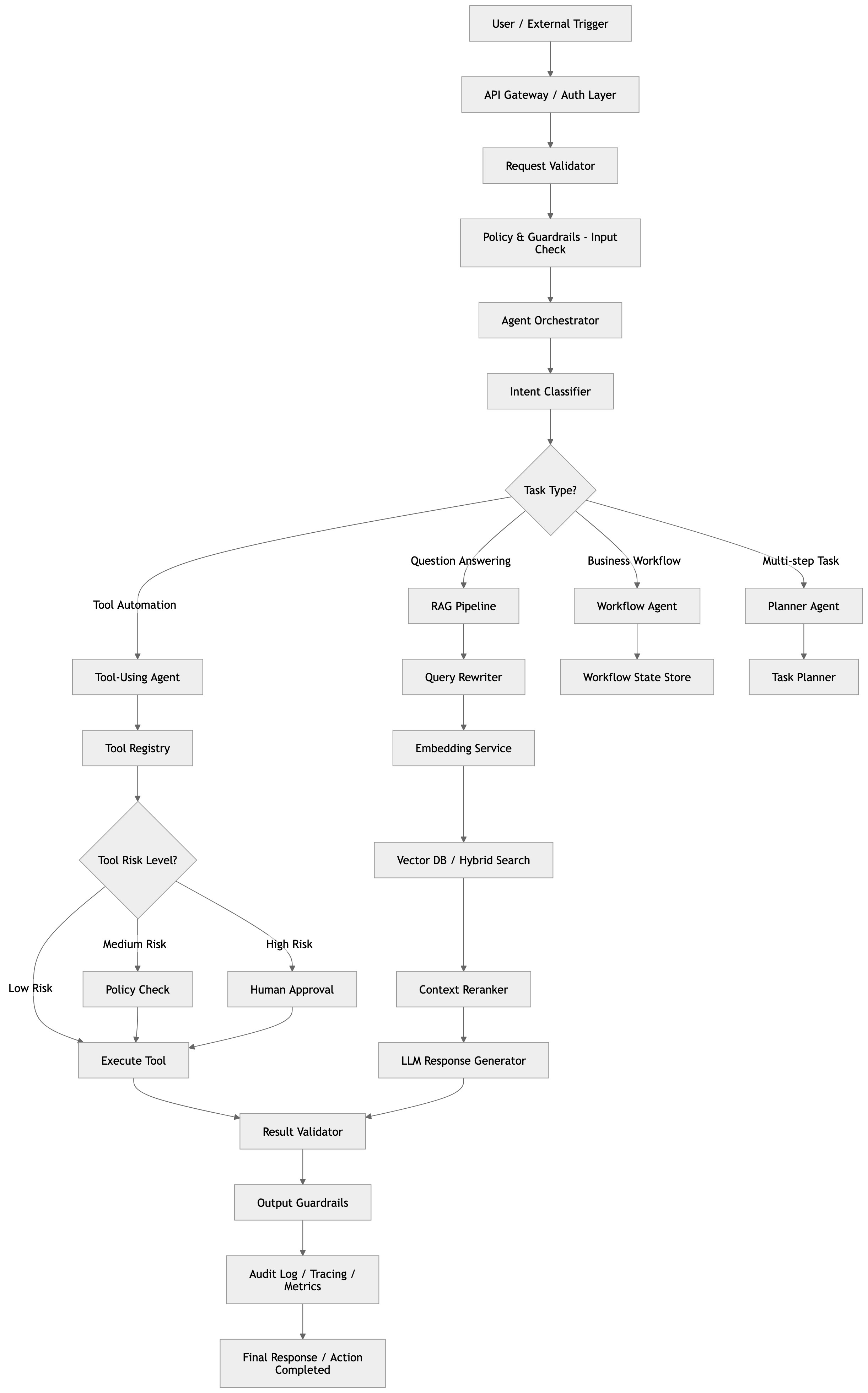
3. Target Use Cases
This architecture supports:
| Use Case | Example |
|---|---|
| Enterprise RAG assistant | Ask questions over internal docs, policies, tickets, code |
| Autonomous support agent | Resolve customer issues using CRM, ticketing, refund tools |
| Developer agent | Read repo, suggest fixes, create PRs with approval |
| Finance operations agent | Reconcile invoices, generate reports, flag exceptions |
| HR agent | Answer policy questions using secure document grounding |
| Sales agent | Summarize leads, enrich CRM, draft follow-ups |
| Workflow automation agent | Multi-step workflows with approvals and retries |
| Multi-agent system | Planner, researcher, coder, reviewer, executor agents |
4. High-Level Design
4.1 Main Components
flowchart TB
    U[User / System Trigger] --> AGW[API Gateway]
    AGW --> AO[Agent Orchestrator]
    AO --> PL[Planning / Reasoning Layer]
    PL --> TE[Tool Execution Layer]
    PL --> RAG[RAG / Memory Layer]
    TE --> GR[Guardrails / Policy Layer]
    GR --> HA[Human Approval Layer]
    HA --> OL[Observability / Audit Layer]
    OL --> FR[Final Response / Action]
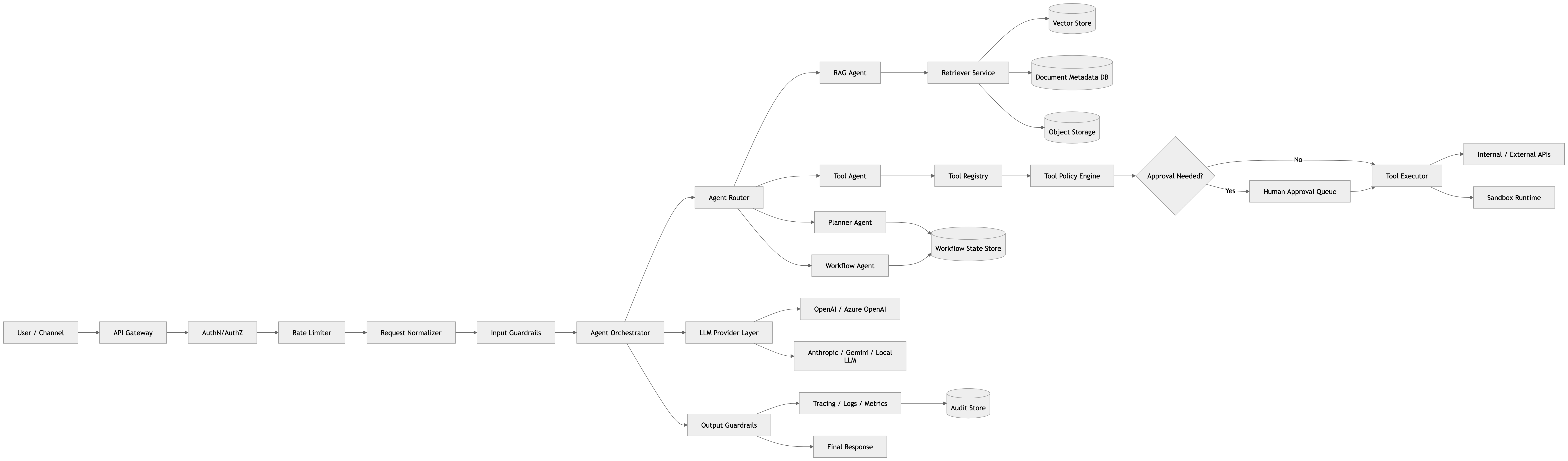
Modular layering ensures separation of concerns, security, and observability.
5. Core Architecture Diagram
6. Production Request Flow
Example: User asks an enterprise AI agent
“Check if customer ABC is eligible for a refund, summarize the reason, and prepare the refund request.”
Flow:
sequenceDiagram
    participant User
    participant API as API Gateway
    participant Orch as Agent Orchestrator
    participant Planner as Planning Layer
    participant RAG as RAG Pipeline
    participant Tools as Tool Execution Layer
    participant Human as Human Approval
    participant Obs as Observability Layer

    User->>API: Submit request
    API->>API: Authenticate user
    API->>Orch: Forward sanitized request
    Orch->>Planner: Classify and plan steps
    Planner->>RAG: Retrieve refund docs
    RAG-->>Planner: Return retrieved docs
    Planner->>Tools: Fetch customer/order data
    Tools-->>Planner: Return data
    Planner->>Orch: Generate refund recommendation
    Orch->>Human: Requires approval (high-risk)
    Human-->>Orch: Approval granted
    Orch->>Tools: Execute refund creation
    Tools-->>Orch: Confirm execution
    Orch->>Obs: Log trace, tool calls, decisions
    Orch-->>API: Return final response
API-->>User: Send response7. Low-Level Design: Agent Runtime
7.1 Agent Runtime Responsibilities
- Select the right agent implementation
- Manage conversation and workflow state
- Call LLMs and tools securely
- Apply guardrails for policy enforcement
- Fetch RAG context for grounding
- Handle retries and compensating logic
- Coordinate human approval processes
- Record detailed traces and logs
- Return structured and auditable outputs
7.2 Agent Runtime Flow Diagram
flowchart LR
    Start[Start request]
    CW[Check Workflow State]
    GI[Guardrails Input Validation]
    AR[Agent Router / Select Agent]
    EX[Execute Agent]
    GO[Guardrails Output Validation]
    HA[Require Human Approval?]
    AP[Await Approval]
    TR[Trace and Audit Logging]
    RESP[Generate & Return Response]

    Start --> CW --> GI
    GI -- Valid --> AR --> EX --> GO
    GO -- Valid --> HA
    HA -- No --> TR --> RESP
    HA -- Yes --> AP --> TR --> RESP
    GI -- Invalid --> RESP
    GO -- Invalid --> RESP
8. Low-Level Design: RAG Pipeline
A production RAG pipeline should incorporate hybrid retrieval, metadata filtering, freshness controls, and citation validation.
8.1 RAG Ingestion Flow
flowchart TD
    DocUpload[Document Upload API]
    Extract[Text Extraction]
    PII[PII & Secrets Scan]
    Chunk[Chunking]
    Embed[Embedding Generation]
    Store[Store in pgvector/PostgreSQL]
    Index[Indexing & Metadata]

    DocUpload --> Extract --> PII --> Chunk --> Embed --> Store --> Index
8.2 RAG Query Flow
flowchart TD
    Query[User Query]
    Rewrite[Query Rewrite]
    Embed[Embedding Generation]
    Search[Vector Search + Filtering]
    Rerank[Reranking]
    Return[Return Top Results]

    Query --> Rewrite --> Embed --> Search --> Rerank --> Return
8.3 RAG Service Component
RagService
│
├── QueryRewriteService
├── EmbeddingService
├── Retriever
│   ├── VectorRetriever
│   ├── KeywordRetriever
│   └── HybridRetriever
├── RerankerService
├── ContextBuilder
├── CitationValidator
└── AnswerGenerator
9. Low-Level Design: Tool Execution Layer
Tool Risk Levels and Risks
| Risk Level | Examples | Mitigations |
|---|---|---|
| Low | Document search, summarization | Basic permission checks |
| Medium | Draft emails, report generation | Additional guardrails |
| High | Send emails, refunds, code deploy | Human approval, audit logging |
Tool Execution Flow
flowchart TD
    Input[Tool Request]
    Auth[Authorization Check]
    RiskAssess[Risk Level Assessment]
    ApprovalReq[Requires Human Approval?]
    ApprovalWait[Wait for Approval]
    Execute[Execute Tool Action]
    Validate[Validate Output]
    Audit[Record Audit Logs]
    Return[Return Result]

    Input --> Auth --> RiskAssess
    RiskAssess -- High --> ApprovalReq
    ApprovalReq -- Yes --> ApprovalWait --> Execute
    ApprovalReq -- No --> Execute
    Execute --> Validate --> Audit --> Return
Tool Registry JSON Schema Example
{
  "name": "create_refund_request",
  "description": "Creates a refund request but does not issue payment",
  "riskLevel": "high",
  "requiresApproval": true,
  "allowedRoles": ["support_manager", "finance_admin"],
  "timeoutSeconds": 30,
  "inputSchema": {
    "customerId": "string",
    "orderId": "string",
    "amount": "decimal",
    "reason": "string"
  }
}
10. Low-Level Design: Human-in-the-Loop (HITL)
HITL Flow Diagram
flowchart TD
    ActionTrigger[High-risk action requires approval]
    Notify[Notify human approver]
    Wait[Wait for human decision]
    Approved[Approved?]
    Execute[Execute action]
    Reject[Reject and abort]
    Log[Log decision]
    Continue[Continue workflow]

    ActionTrigger --> Notify --> Wait --> Approved
    Approved -- Yes --> Execute --> Log --> Continue
    Approved -- No --> Reject --> Log --> Continue
Approval Record Fields
- Request ID
- User ID
- Tenant ID
- Agent ID
- Tool name
- Tool arguments
- Risk level
- Retrieved evidence
- Model reasoning summary
- Approver
- Approval decision
- Timestamp
- Final execution result
11. Recommended Tech Stack
11.1 Enterprise .NET-Centric Stack
| Layer | Recommended Stack |
|---|---|
| Frontend | React, Next.js, Tailwind |
| API | ASP.NET Core Web API |
| Agent Runtime | .NET orchestration service + optional Python workers |
| Agent Framework | Semantic Kernel, LangGraph, OpenAI Agents SDK |
| LLM Provider | OpenAI, Azure OpenAI, Anthropic, Gemini, local models |
| RAG Store | PostgreSQL + pgvector, Azure AI Search, OpenSearch... |
| Database | PostgreSQL or SQL Server |
| Cache | Redis |
| Queue/Event Bus | RabbitMQ, Kafka, Azure Service Bus, AWS SQS/SNS |
| Object Storage | S3, Azure Blob Storage, GCS |
| Workflow State | PostgreSQL, Redis, Temporal, Durable Functions |
| Observability | OpenTelemetry, Prometheus, Grafana, Application Insights |
| Logging | Serilog, ELK/OpenSearch |
| Secrets | Azure Key Vault, AWS Secrets Manager, HashiCorp Vault |
| Auth | OAuth2/OIDC, Entra ID, Auth0, Keycloak |
| Containers | Docker |
| Orchestration | Kubernetes, Azure Container Apps, ECS, AKS/EKS/GKE |
| CI/CD | GitHub Actions, Azure DevOps, GitLab CI |
| Evaluation | Promptfoo, Ragas, custom golden dataset tests |
16. Example Code: LLM Abstraction in C#
Below is a minimal, realistic interface abstraction for calls to LLM providers.
public sealed record LlmMessage(string Role, string Content);

public sealed record LlmRequest(
    string Model,
    IReadOnlyList<LlmMessage> Messages,
    double Temperature = 0.2,
    int MaxTokens = 1500
);

public sealed record LlmResponse(
    string Content,
    int PromptTokens,
    int CompletionTokens,
    string Model
);

public interface ILlmClient
{
    Task<LlmResponse> CompleteAsync(
        LlmRequest request,
        CancellationToken cancellationToken = default);
}
Notice the abstraction provides flexibility for multiple providers and measures token usage for cost control.
19. Example Code: RAG Agent Implementation
Here is a simplified yet realistic example of a RAG-backed agent component combining retrieval and LLM completion:
public sealed class RagAgent : IAgent
{
    private readonly IRagService _ragService;
    private readonly ILlmClient _llmClient;

    public string Name => "rag-agent";

    public RagAgent(IRagService ragService, ILlmClient llmClient)
    {
        _ragService = ragService;
        _llmClient = llmClient;
    }

    public async Task<AgentResponse> ExecuteAsync(
        AgentRequest request,
        CancellationToken cancellationToken)
    {
        // Retrieve relevant context documents
        var context = await _ragService.RetrieveAsync(
            new RagQuery
            {
                TenantId = request.TenantId,
                UserId = request.UserId,
                Query = request.Message,
                TopK = 8
            },
            cancellationToken);

        // Build grounded prompt with citations
        var prompt = BuildPrompt(request.Message, context);

        // Query the LLM with structured messages
        var llmResponse = await _llmClient.CompleteAsync(
            new LlmRequest(
                Model: "gpt-4.1",
                Messages:
                [
                    new LlmMessage("system", "You are a grounded enterprise assistant. Use only the supplied context. Cite sources."),
                    new LlmMessage("user", prompt)
                ]),
            cancellationToken);

        return new AgentResponse
        {
            RequestId = request.RequestId,
            Status = "Completed",
            Answer = llmResponse.Content,
            Citations = context.Chunks.Select(x => new Citation
            {
                DocumentId = x.DocumentId,
                ChunkId = x.ChunkId,
                Title = x.Title
            }).ToList()
        };
    }

    private static string BuildPrompt(string question, RagContext context)
    {
        var chunks = string.Join("\n\n", context.Chunks.Select((c, i) =>
            $"[Source {i + 1}: {c.Title}]\n{c.Content}"));

        return $"""
        Question:
        {question}

        Context:
        {chunks}

        Instructions:
        - Answer using only the context.
        - If the answer is not present, say you do not know.
        - Include source references.
        """;
    }
}
This example shows how to combine retrieval with trustworthy LLM usage including citations.
Observability
What to Log
- Agent run IDs and timestamps
- User and tenant identifiers
- Input and output text hashes (avoiding PII)
- Model name, prompt and completion token counts
- Tool calls, including inputs, outputs, risk level, and approval status
- Guardrail decision logs for input and output validation
- Human approval requests and decisions
- RAG retrieved document IDs, similarity scores, and reranking results
- Latency and error details per component
- Cost metrics per LLM/tool call
Structured Log Example (JSON)
{
  "timestamp": "2024-05-20T12:34:56Z",
  "agentRunId": "123e4567-e89b-12d3-a456-426614174000",
  "tenantId": "tenant-42",
  "userId": "user-99",
  "model": "gpt-4.1",
  "promptTokens": 850,
  "completionTokens": 150,
  "costUsd": 0.0123,
  "toolCall": {
    "toolName": "create_refund_request",
    "riskLevel": "high",
    "status": "approved",
    "durationMs": 350
  },
  "guardrails": {
    "inputValidation": "passed",
    "outputValidation": "passed"
  },
  "humanApproval": {
    "required": true,
    "approvedBy": "manager-007",
    "decisionTimestamp": "2024-05-20T12:36:00Z"
  },
  "latencyMs": 2900,
  "error": null
}
Key Metrics to Track
| Metric Category | Important Metrics | Description |
|---|---|---|
| RED (Request, Error, Duration) | Agent run per minute, error rate, median latency | Monitor performance and errors of AI agent requests |
| USE (Utilization, Saturation, Errors) | CPU, Memory, Disk IO, DB connections, message queue depth | Resource monitoring to avoid saturation and failures |
Distributed Tracing with OpenTelemetry (C# snippet)
using OpenTelemetry.Trace;

public class TraceService : ITraceService
{
    private readonly Tracer _tracer;

    public TraceService()
    {
        var tracerProvider = Sdk.CreateTracerProviderBuilder()
            .AddSource("AiAgent")
            .SetResourceBuilder(ResourceBuilder.CreateDefault().AddService("AiAgentService"))
            .AddAspNetCoreInstrumentation()
            .AddHttpClientInstrumentation()
            .AddOtlpExporter()
            .Build();

        _tracer = tracerProvider.GetTracer("AiAgent");
    }

    public IDisposable StartTrace(Guid runId, string operationName)
    {
        var span = _tracer.StartActiveSpan(operationName);
        span.SetAttribute("agent.run_id", runId.ToString());
        return span;
    }
}
This snippet illustrates how to hook OpenTelemetry tracing into requests for full observability.
SLI / SLO Table
| SLI | Target SLO | Comments |
|---|---|---|
| Request success rate | ≥ 99.9% | Successful agent responses |
| Average request latency | ≤ 1.5 seconds | End-to-end LLM + tool execution |
| Tool execution failure rate | ≤ 0.1% | Includes authorization and runtime |
| Human approval turnaround time | ≤ 5 minutes | For high-risk tool operations |
| System uptime | ≥ 99.95% | Including API and backend services |
Alerts Worth Paging On
- Repeated tool execution failures > threshold in short window
- Human approval queue backing up over SLA
- Unexpected spike in guardrail rejections or input validation failures
- LLM latency exceeding critical limits
- Resource saturation that may impact performance (CPU, DB connections)
- Authentication/authorization errors indicating possible breaches or misconfiguration
Summary
This enhanced article provides comprehensive enterprise-ready AI agent architecture with layered design, multiple diagrams including flow and sequence diagrams, as well as rich, realistic C# code examples demonstrating key components — LLM client abstraction, RAG integration, agent orchestration, tool execution, and human-in-the-loop coordination.
Observability, security controls, scalability concerns, and reliable production practices — including audit logging, retries, idempotency, and evaluations — are integrated throughout.
The architecture emphasizes never granting direct control to LLMs over production systems but rather using LLMs as propose-only components combined with strict policy enforcement, tool-layer actions, and human oversight, which is essential in any modern enterprise AI deployment.
This article aims to empower experienced engineers to build robust AI agent platforms that meet demanding production SLAs and compliance requirements.